-
Shop
- Advanced Technologies
- AI Skills
- Apple Accessories
- Arts, Crafts & Hobbies
- Bathroom
- Beauty
- Best-Sellers
- Car Accessories
- Car Buying & Ownership
- Confidence
- Dating & Social Skills
- Digital Resources
- Education & Learning
- Family & Parenting
- Fashion
- Alexander McQueen
- Bags & Wallets
- Balenciaga
- Belts
- Blazers
- Bottega Veneta
- Bottoms
- Brunello Cucinelli
- Burberry
- Chanel
- Chloé
- Dior
- Dolce & Gabbana
- Dresses
- Etro
- Fendi
- Gucci
- Hats & Hair Accessories
- Hoodies & Sweatshirts
- Jacquemus
- Jewelry
- Jil Sander
- Jimmy Choo
- Kiton
- Luggage
- Men's Fashion
- Miu Miu
- Off-White
- Outerwear
- Prada
- Rick Owens
- Saint Laurent
- Scarves
- Shoe Accessories
- Shoes
- Skirts
- Socks & Tights
- Sunglasses
- Sweaters & Cardigans
- The Row
- Tom Ford
- Tops & Shirts
- Valentino
- Valentino Garavani
- Versace
- Vivienne Westwood
- Watches
- Fashion Accessories
- Furniture
- Gadgets
- Gift Ideas
- Gifts
- Health & Beauty
- Health & Wellness
- Home & Garden
- Home & Kitchen
- Home Electronics
- Home Styling & Organization
- Home Supplies
- Kids & Babies
- Kids & Babies
- Kitchen
- Lighting
- Nike
- Parenting & Child Development
- Patio, Lawn & Garden
- Personal Growth
- Personal Style & Fashion
- Pet Care
- Pet Lifestyle & Wellness
- Pet Supplies
- Pets
- Sport & Outdoors
- Super Deals
- Travel
- Travel & Adventure
- Wealth
- Wellness
- Popular
- Best deals
Wired 7.1 Gaming Headset: Noise-Cancelling Mic & Clarity
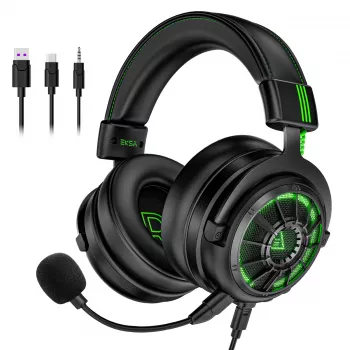
7.1 Surround Sound Wired Gaming Headset with Noise Cancelling Mic
Clear positional audio and clean voice chat can change how a match feels—footsteps become easier to place, explosions stay controlled, and teammates hear callouts without background clutter. A wired 7.1 headset focuses on stable connection, immersive surround effects, and a noise-cancelling microphone so communication stays consistent across long sessions, scrims, and late-night co-op runs. For more guidance, see Reviews by systemBuilder.
What It’s Built to Do
This style of headset is designed for players who want reliable, detail-forward audio and straightforward plug-in performance. The goal is to make directional cues easier to interpret while keeping voice chat intelligible. For further reading, see The 6 Best Gaming Headsets of 2026.
- Create a more precise sense of direction for footsteps, reloads, and ability cues with 7.1 surround processing
- Keep voice chat clear with a noise-cancelling microphone that reduces room noise and keyboard sounds
- Deliver dependable audio with a wired connection—no battery anxiety, fewer dropouts, and low-latency playback
- Support long play sessions with a fit designed for extended wear and stable positioning
- Work well for competitive play, co-op raids, and single-player immersion where spatial detail matters
Sound Experience: Surround, Balance, and Detail
Virtual 7.1 processing aims to make “where” just as obvious as “what.” When the mix is right, you can distinguish left vs. right quickly and also reduce the classic confusion between front and back. A wired connection helps keep that sound profile consistent from session to session, since you’re not dealing with changing wireless conditions or battery-related output variations.
- Positional cues: surround effects help differentiate left/right and front/back placement, especially in shooters
- Separation: clearer layering between dialogue, effects, and music reduces “muddy” moments in busy scenes
- Low end control: impactful bass is useful for explosions, but it shouldn’t overwhelm footsteps and midrange detail
- Volume headroom: adequate loudness without distortion helps when switching between quiet and loud game moments
- Consistency: wired signal can help maintain the same sound profile across sessions and devices
Quick performance checklist for gaming audio
| What to listen for | Why it matters | How to test fast |
|---|---|---|
| Footstep directionality | Helps pre-aim and rotate earlier | Walk in a circle in a training range and track direction changes |
| Center clarity (voices) | Improves story dialogue and team comms | Play a voice line while firing nearby; confirm words stay understandable |
| Explosion control | Prevents fatigue and masking | Trigger repeated explosions; check whether footsteps disappear |
| Wide vs. accurate stage | Avoids “big but vague” surround | Listen for front/back distinction, not only left/right width |
Noise-Cancelling Mic: Clear Comms Under Real Conditions
A noise-cancelling mic is less about studio-grade polish and more about winning the battle for intelligibility. The most valuable improvements usually show up during messy moments—teammates talking over each other, keys clacking, or a PC fan ramping up mid-fight.
- Background suppression: reduces steady noises like fans and mild room hum so speech stays forward
- Plosive handling: placing the mic slightly off-center from the mouth can reduce pops on “P/B” sounds
- Callout intelligibility: crisp mids typically matter more than boomy bass for competitive voice chat
- Muting habits: hardware/software mute helps keep comms clean when not speaking
- Mic monitoring (if available): hearing your own voice level can prevent unintentional shouting
If you’re troubleshooting voice quality in popular chat apps, the platform guides can be genuinely useful—see Discord’s Voice and Video Troubleshooting for quick checks on input device selection and levels.
Comfort and Build for Long Sessions
Audio performance is only half the story if the headset shifts every time you flick your mouse or gets uncomfortable an hour into a tournament block. Fit affects both comfort and sound because maintaining a consistent ear seal helps preserve bass and imaging.
- Clamp and seal: a stable seal improves isolation and low end; too much clamp can cause fatigue
- Padding and heat: breathable cushions reduce heat buildup during longer matches
- Headband fit: weight distribution across the head often matters more than total weight alone
- Cable practicality: consider length and routing so the cable doesn’t tug during quick turns
- Durability checks: sturdy yokes and strain relief near connectors help in the highest-wear zones
Setup Tips: Getting the Best Out of 7.1 on PC and Console
Who It Suits Best
Shop In-Stock Picks
- 7.1 Surround Sound Wired Gaming Headset with Noise Cancelling Mic — a wired option focused on positional sound and cleaner voice pickup.
- Calvin Klein Women’s Spring/Summer Backpack — a practical everyday bag option for carrying a controller, cables, and small accessories.
- New Balance 1906R Light Blue Leather Sneakers — comfortable footwear for long event days and casual wear between sessions.
At-a-Glance Product Summary
Product snapshot
| Item | Details |
|---|---|
| Product | 7.1 Surround Sound Wired Gaming Headset with Noise Cancelling Mic |
| Price | 81.51 USD |
| Availability | In stock |
FAQ
Does 7.1 surround work on all games?
Virtual 7.1 works broadly, but results vary by each game’s audio mix and whether it includes a dedicated headphone/spatial mode. For the cleanest positioning, enable only one surround system at a time and test in a practice area.
Will a noise-cancelling mic block keyboard and fan noise completely?
No—noise reduction typically lowers steady background sounds and can soften some typing, but it won’t remove everything. Mic placement, reasonable input gain, and push-to-talk usually make the biggest difference.
Is a wired headset better for competitive play than wireless?
Wired headsets often deliver stable, low-latency audio with no charging or wireless interference to manage. Wireless can still perform well, but quality depends on the connection, codec, and the environment.
Recommended for you
Was this article helpful?
Yes
No









Leave a comment