-
Shop
- Advanced Technologies
- AI Skills
- Apple Accessories
- Arts, Crafts & Hobbies
- Bathroom
- Beauty
- Best-Sellers
- Car Accessories
- Car Buying & Ownership
- Confidence
- Dating & Social Skills
- Digital Resources
- Education & Learning
- Family & Parenting
- Fashion
- Alexander McQueen
- Bags & Wallets
- Balenciaga
- Belts
- Blazers
- Bottega Veneta
- Bottoms
- Brunello Cucinelli
- Burberry
- Chanel
- Chloé
- Dior
- Dolce & Gabbana
- Dresses
- Etro
- Fendi
- Gucci
- Hats & Hair Accessories
- Hoodies & Sweatshirts
- Jacquemus
- Jewelry
- Jil Sander
- Jimmy Choo
- Kiton
- Luggage
- Men's Fashion
- Miu Miu
- Off-White
- Outerwear
- Prada
- Rick Owens
- Saint Laurent
- Scarves
- Shoe Accessories
- Shoes
- Skirts
- Socks & Tights
- Sunglasses
- Sweaters & Cardigans
- The Row
- Tom Ford
- Tops & Shirts
- Valentino
- Valentino Garavani
- Versace
- Vivienne Westwood
- Watches
- Fashion Accessories
- Furniture
- Gadgets
- Gift Ideas
- Gifts
- Health & Beauty
- Health & Wellness
- Home & Garden
- Home & Kitchen
- Home Electronics
- Home Styling & Organization
- Home Supplies
- Kids & Babies
- Kids & Babies
- Kitchen
- Lighting
- Nike
- Parenting & Child Development
- Patio, Lawn & Garden
- Personal Growth
- Personal Style & Fashion
- Pet Care
- Pet Lifestyle & Wellness
- Pet Supplies
- Pets
- Sport & Outdoors
- Super Deals
- Travel
- Travel & Adventure
- Wealth
- Wellness
- Popular
- Best deals
Overhead Magnetic Phone Mount Arm for Stable Filming
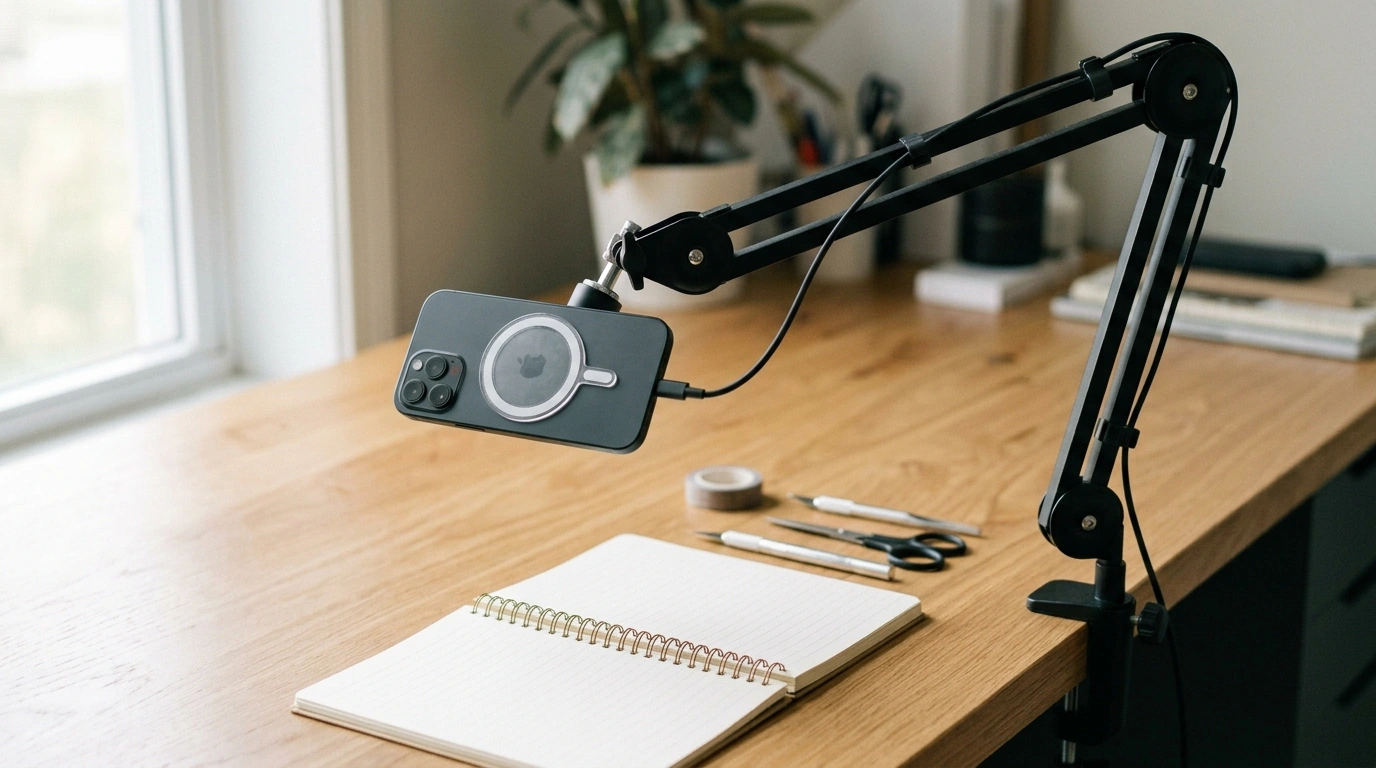
Adjustable Overhead Articulating Arm Phone Mount with Magnetic Holder
An overhead phone mount makes it easier to record hands-free video, follow recipes, take calls, or keep a screen visible without cluttering the workspace. This adjustable articulating arm design is built to position a phone above a desk, counter, or bedside surface, while a magnetic holder helps make attaching and removing the device quick. With multiple joints for angle control, it can be set for top-down filming, face-forward viewing, or side angles for tutorials and livestreams. The result is a cleaner setup that supports steady framing and more comfortable viewing throughout the day.
What This Overhead Arm Mount Helps With
- Creates a stable, hands-free phone position above a work surface for filming, viewing, or calling
- Keeps the phone out of the way of tools, ingredients, keyboards, and notebooks
- Supports quick angle changes for switching between overhead shots and face-forward viewing
- Useful for repeatable framing when recording multiple clips or photographing projects
For a simple, streamlined setup, the Adjustable Overhead Articulating Arm Phone Mount with Magnetic Holder is designed to place your screen where you need it—without sacrificing your working area.
Key Parts and Adjustments
- Articulating arm joints allow incremental repositioning without moving the base each time
- Overhead reach helps place the phone centered over a workspace for a true top-down view
- Magnetic holder enables fast docking and removal when stepping away or changing tasks
- Angle tuning at the head helps reduce glare and keep the horizon level for video
If you switch between tasks often—like checking a timer, replying to a message, and then hitting record again—the magnetic dock-and-go style can save time compared with clamps that require re-tightening each time.
Setup Basics for a Stable Overhead View
- Choose a solid mounting surface (desk edge, countertop lip, sturdy nightstand) that does not flex
- Position the base so the arm can extend over the target area without being fully maxed out
- Start with the arm lower than needed, then raise and fine-tune angles to reduce wobble
- After adjustments, gently test stability by tapping the surface and confirming the frame settles quickly
- Route charging cables with slack near joints so movement does not tug the phone or shift framing
A practical habit for steadier footage: make one joint change at a time, then pause. Micro-movements can compound when several joints are loose at once, especially when the phone is positioned far from the base.
Best Uses: Filming, Calls, and Daily Viewing
- Top-down filming for cooking, unboxing, crafts, sketching, journaling, and repair work
- Desk companion for video calls where the camera stays centered without a tripod on the desk
- Bedside or couch setup to keep the screen at eye level, reducing neck bend compared with holding the phone
- Productivity workflows like referencing checklists, timer apps, or notes without consuming desk space
- Content creation where consistent camera placement improves continuity across takes
Suggested positions and when to use them
| Position | Best for | Practical tip |
|---|---|---|
| Direct overhead (top-down) | Cooking, crafts, tutorials, flat-lay shots | Keep the arm not fully extended to reduce vibration |
| Slight forward tilt | Writing, drawing, assembling small parts | Angle to minimize glare from overhead lights |
| Face-forward over monitor/desk | Calls, livestreams, presentations | Center the phone at eye level to avoid unflattering angles |
| Side angle | Demonstrations and close-ups | Lock joints progressively from base to head for steadier framing |
Stability, Safety, and Magnet Considerations
- For steadier video, minimize total extension and keep heavier components closer to the base
- Avoid mounting on thin folding tables or wobbly surfaces that amplify shake
- Magnets can affect some implanted medical devices; keep a safe distance if applicable and follow medical guidance
- Keep magnetic surfaces away from magnetic stripe cards and sensitive items stored in the same area
- If filming over food or delicate work, confirm the holder is secure before letting go of the phone
For official guidance on magnets and medical devices, review Apple Support’s safety information for iPhone magnets (MagSafe) and medical devices and the U.S. FDA overview on magnetic field interference with medical devices.
Compatibility and Everyday Practicalities
- Works best when the phone can mate cleanly to the magnetic holder (directly or via a compatible plate/case)
- Check that the holder placement does not block camera lenses for the angles commonly used
- If using a case, confirm it allows a firm magnetic connection and does not introduce wobble
- Consider whether the setup needs frequent phone removal; magnetic attachment is ideal for quick on/off routines
Care, Maintenance, and Long-Term Use
Troubleshooting Common Issues
In-Stock Picks to Round Out Your Setup
- Adjustable Overhead Articulating Arm Phone Mount with Magnetic Holder — a clean way to keep your phone positioned above your workspace for filming, viewing, and calls.
- Calvin Klein Women’s Spring/Summer Backpack — helpful for carrying a small creator kit (charger, mic, compact light, and cables) when working away from home.
- New Balance 1906R Light Blue Leather Sneakers — a comfortable option when you’re on your feet for long kitchen shoots, craft sessions, or workshop recording.
FAQ
Will the magnetic holder work with a phone case?
It works best with cases designed for magnetic mounts or when using a compatible magnetic plate. Very thick or textured cases can weaken the connection, so make sure the phone sits flat and doesn’t wobble.
How can shaking be reduced for overhead filming?
Mount the base to a rigid surface, avoid fully extending the arm, and tighten joints after setting your angle. After any adjustment, give the setup a moment to settle before recording.
Is it safe to use a magnetic phone mount around medical devices?
Magnets may interfere with some implanted medical devices, so it’s important to keep appropriate distance and follow both medical guidance and the device manufacturer’s recommendations.
Recommended for you

Was this article helpful?
Yes
No








Leave a comment